Editor score 4.2 / 5
Insight
Fashionreps' Kailas jacket catalog is suitable for viewing currently visible candidate products, but the catalog page itself cannot replace a version log. If you want to determine whether a jacket's images, sizes, or descriptions have changed, the safest approach is to first save the catalog's state on that day, then write each review result into Google Sheets, and keep track of differences before and after.

First, record the catalog page's state on that day
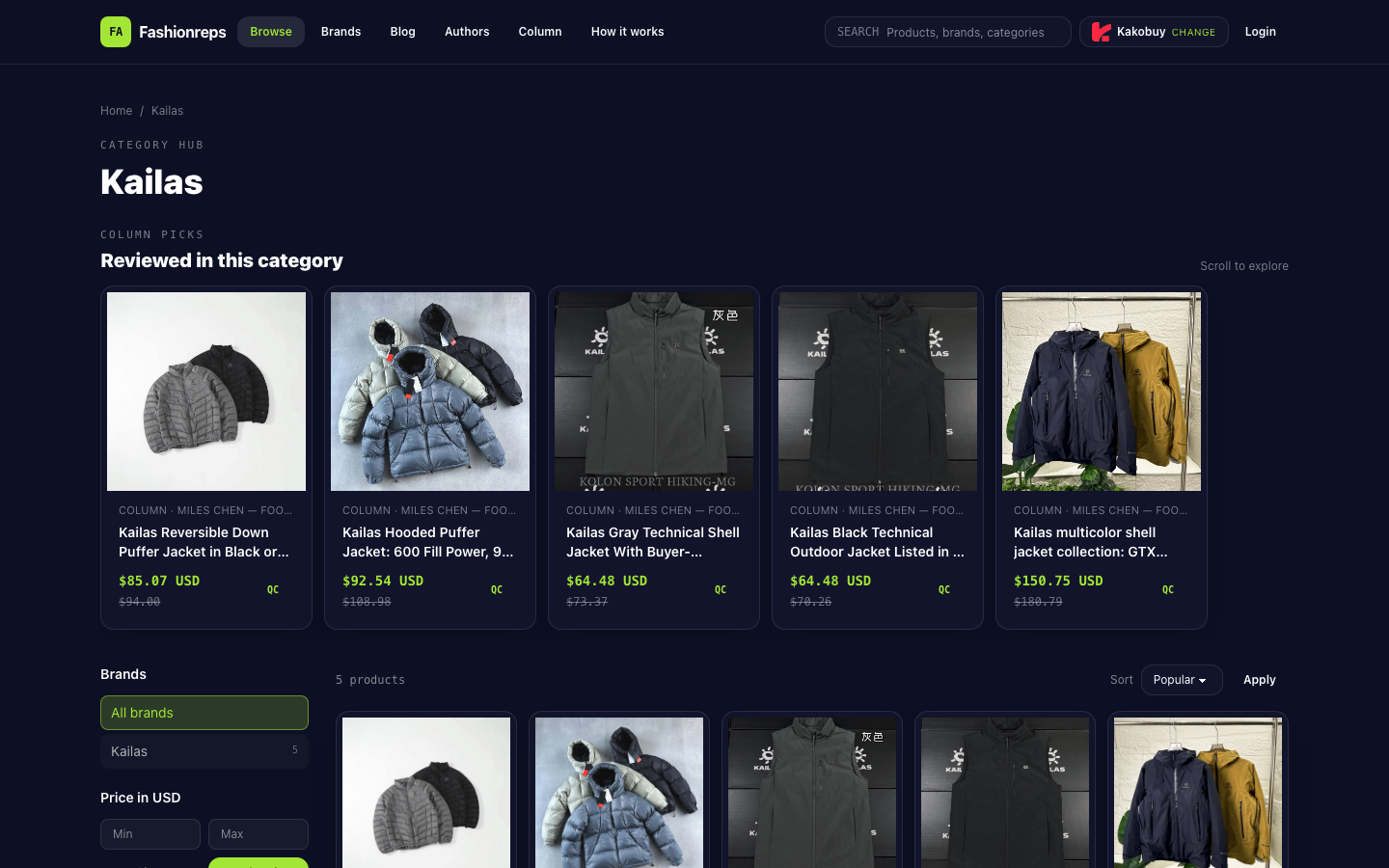
As of October 25, 2026, Fashionreps' Kailas category page displays 5 product candidates. The page offers brand filtering, USD price range filtering, and sorting options by popularity, newest, price low to high, and price high to low. The page also displays breadcrumb navigation, product cards, and a site search entry.
The product descriptions visible in the catalog are not entirely consistent. For example, one product title includes 600 Fill Power, stand collar, and reversible information; another includes 600 Fill Power, 91–95% Down, and 300 g-Plus Fill Weight; a technical jacket's title includes color, buyer feedback size notes, or an M–4XL size range.
These fields should be recorded as they appear on the page at that time, without inferring complete size charts, inventory, shipping, or actual warmth performance from the titles. Currently verified is the category page summary, not the product detail pages' full images, color options, and size fields, so those need to be reviewed item by item after opening the corresponding product pages.
Which fields should Google Sheets record?
Don't just save a "last checked date". To see changes over time, save at least one row per product with the current state, and add a new review record whenever a change occurs.
| Field | Recording method | Purpose |
|---|---|---|
| Product identifier | Page title plus product link | Avoid confusion between products with similar names |
| Page title | Copy as-is from the page | Check if the title changes |
| Image record | Number of images, main image description, screenshot date | Determine if images are replaced or reduced |
| Color fields | Record only colors explicitly listed on the page | Check color description changes |
| Size fields | Copy the size range or size chart shown on the page | Avoid treating title information as a complete size chart |
| Style type | Down, technical shell, reversible, etc. | Facilitate filtering candidates |
| Page description | Save key material, fill, or feature text as-is | Track description additions or deletions |
| Record date | Use the date of review | Establish chronological order |
| Difference notes | Specify added, deleted, or rewritten fields | Facilitate reviewing reasons for changes |
| Link status | Valid, invalid, or needs re-verification | Prevent ordering based on invalid pages |
For the image field, don't just write "has image" or "no image". If you need to track image changes, record whether the main image on the page is replaced, whether the number of images changes, and the date of the corresponding screenshot. Screenshots are evidence of the page state, not proof of the product's actual quality or personal verification results.
One row for current state, another for change log
For smaller tables, you can keep current state and change records in the same sheet; if you need long-term tracking, it's recommended to split into two sheets.
The first is "Current Catalog", where each product keeps only the latest state for filtering and viewing. The second is "Change Log", where each re-verification adds a new row containing at least product identifier, verification date, changed field, old value, new value, evidence screenshot, and review conclusion.
For example, when the title changes from "Gray Technical Shell Jacket" to a version containing size notes, don't directly overwrite the old title. The change log should store the old and new titles separately, and explain whether this is a title text change or the detail page newly added size information. If only the title shows M–4XL and the detail page has no complete size chart, continue marking it as "needs verification", and don't compile it into a conclusion that every size is available.
What the catalog page and Google Sheets are each good for
The Fashionreps catalog page is good for discovering and browsing current candidates: you can filter products by Kailas brand, or view the 5 catalog entries by price or page sorting. The titles and reference prices on product cards are suitable for initial positioning, but the catalog page shows the current page state.
Google Sheets is good for preserving history: you can filter by style type, size fields, image dates, and link status, and also compare records across different dates via the change log. The sheet doesn't automatically prove that the page changed; you still need to reopen the page and save evidence.
The division of labor can be simply understood as: the catalog page is responsible for discovering current page content, and the sheet is responsible for organizing content you have already verified. Don't treat old records in the sheet as current inventory, current price, or current product details.
Review process after detecting changes
When you re-check the catalog or product pages, you can handle it in this order:
- First record the review date and save a current page screenshot.
- Match old records using product link and title, not just color.
- Compare images, colors, sizes, styles, and description fields item by item.
- If the title changes but the detail page does not change synchronously, mark it as a field conflict.
- If images contradict the title description, keep both as-is and mark for manual review.
- If the link doesn't open, the product is removed, or page information is incomplete, do not list it as a recommended purchase.
- Only after the new page content has been verified, update the latest values in "Current Catalog".
Boundaries of current evidence
The current verification can only support recording the Kailas category catalog structure and visible product summaries. It cannot support real-time inventory, final transaction price, shipping, complete size fit, image authenticity, or product quality judgments for specific products. The reference prices on the category page should also not be directly treated as checkout prices.
Therefore, the most important role of Google Sheets is not to guarantee the page, but to let you clearly distinguish between the current page, historical records, and information pending verification. As long as each change retains the date, original text, and evidence, you can later determine whether you are relying on the latest page or outdated old records.