Editor score 4.2 / 5
Insight
This comparison solves one pre-purchase question: when you spot New Balance shoes on fashionreps and want to cross-check with other shopping platforms, how do you determine whether the shoe name, size, images, and QC evidence truly correspond to the same product?
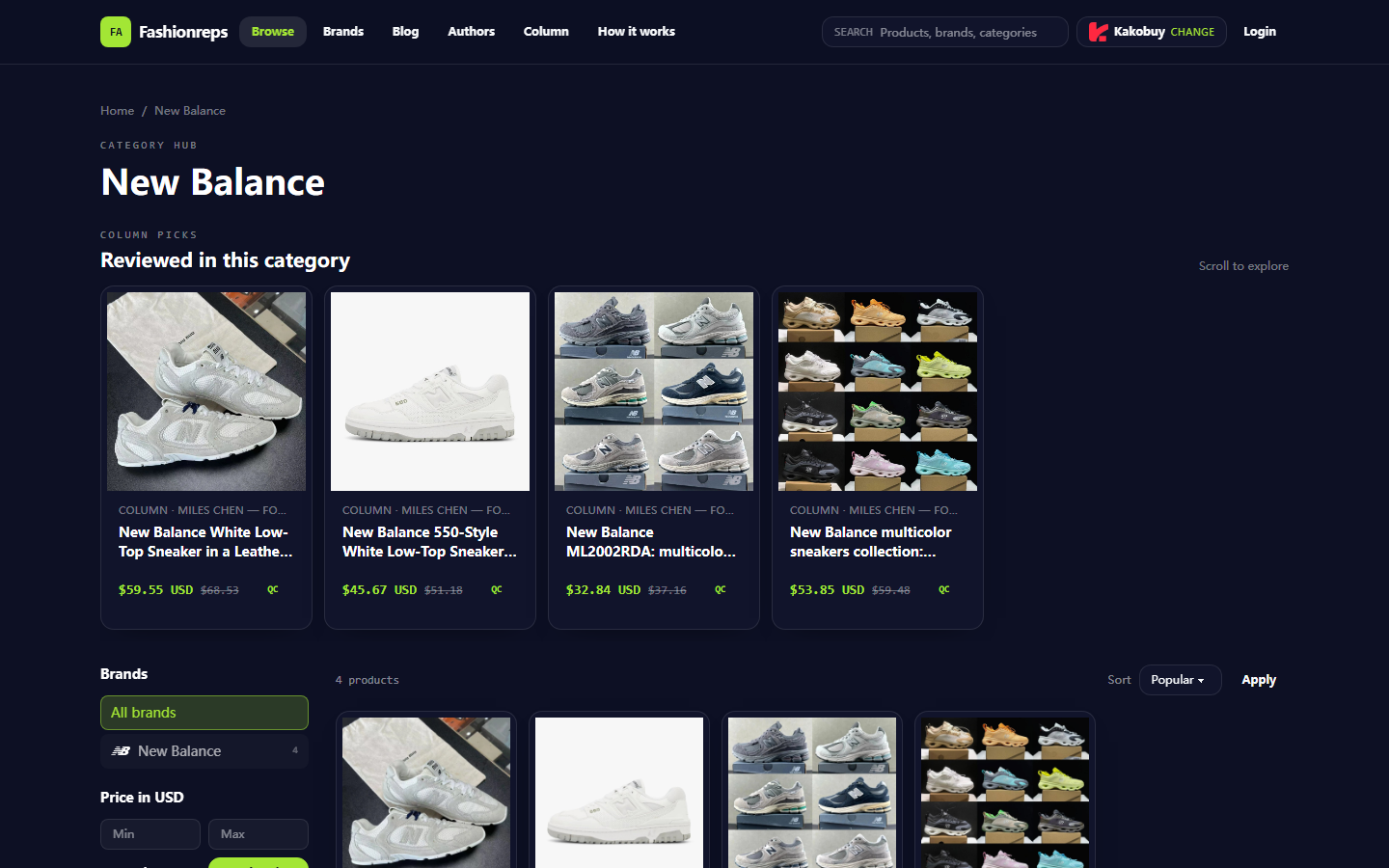
This article is compiled from the New Balance category page records provided by fashion-reps.net. The page displayed 4 New Balance product entries with their then-visible names, reference prices, and QC entry points; this information is a snapshot and should not be treated as current inventory, final transaction price, or verified authentic information. For other platforms, if there are no publicly verifiable product pages, update timestamps, or original QC images, they can only be marked as lacking evidence and cannot be supplemented with speculation.

Specific Decisions in This New Balance Platform Comparison
The goal of the comparison is not to declare one platform absolutely better, but to determine whether a specific New Balance item is worth moving to the next step of verification.
After reading, buyers should be able to perform three actions:
- Record the full product name, page price, size information, and QC entry from the fashionreps product page.
- Search for corresponding fields on other platforms item by item to confirm whether it might be the same shoe model, rather than just looking at similar images.
- Judge whether the evidence is sufficient before payment; if key fields are missing, pause the purchase and request additional information.
This method is not applicable to after-sales disputes where you already have a complete order number, warehouse photos, and after-sales records, nor is it for finding the lowest price based on brand name alone. Prices, inventory, sizes, materials, sellers, shipping, and platform policies may change and should be re-verified before placing an actual order.
First Confirm the Visible New Balance Product Pages on fashionreps
The provided fashionreps New Balance category page shows 4 product entries visible at the time:
| Visible Product Name on Page | Visible Reference Price on Page | Visible Clues on Page |
|---|---|---|
| New Balance White Low-Top Sneaker in a Leather and Sheepskin Trainer Build | 59.55 USD | Page also shows a previous reference price of 68.53 USD, with a QC entry |
| New Balance 550-Style White Low-Top Sneakers in Eight Colorways | 45.67 USD | Page shows 8 colorways, with a QC entry |
| New Balance ML2002RDA: multicolor 2002R with pigskin suede, mesh, and T-Beam support | 32.84 USD | Name includes ML2002RDA, pigskin suede, mesh, and T-Beam descriptions |
| New Balance multicolor sneakers collection: mesh-and-PU casual sneaker with a 3–5 cm internal wedge heel | 53.85 USD | Name includes mesh, PU, and 3–5 cm internal wedge heel description |
These fields only prove that the category page displayed the corresponding text and prices at that time, and cannot alone prove the following:
- The shoe model is exactly the same as the official retail model.
- The materials described on the page have been confirmed by physical testing.
- The page price includes shipping, service fees, taxes, or storage fees.
- There is still inventory, or all colorways and sizes are available for purchase.
- The images in the QC entry belong to the current order, not sample images.
When recording, you should save the page access date, original product name, price currency, page screenshot or export record, and whether the QC entry can be opened. If the page redirects, displays empty content, or cannot confirm the product name, do not count it as a valid product sample.
How to Record Shoe Names, Sizes, and Images from Other Platforms
Other platforms cannot just fill in "has New Balance" or "lower price". At minimum, you need to record item by item: model clues, colorways, size range, material description, seller information, number of product images, and update time.
It is recommended to use the same recording format:
| Verification Field | fashionreps Record | Other Platform Record | Judgment Method |
|---|---|---|---|
| Shoe name or model | Keep full page name | Keep full page name | Whether the model, series, and key suffix are consistent |
| Colorway | Record colors or number of colors explicitly stated on page | Record visible colorway names | Image similarity cannot replace text confirmation |
| Size | Record the size range actually displayed on page | Record actually selectable sizes and update time | Mark missing if no size chart |
| Material and structure | Record page text description | Record page text description | Do not rewrite promotional words as physical conclusions |
| Product images | Record number of images and visible angles | Record number of images and visible angles | Images only support external observation |
| Seller and update time | Record visible page information | Record visible page information | Mark high volatility if update time missing |
| QC evidence | Record whether entry exists and image status | Record whether entry exists and image status | Cannot write as QC passed without original images |
If both platforms use series names like "550" or "2002R", this still cannot directly confirm they are the same product. You must also check model suffix, upper color, sole shape, tongue logo, heel structure, and size chart. If any key field appears on only one side, it should be marked as "to be confirmed".
How to Build a Comparison Table for QC Image Entries and Visible Details
The value of QC evidence is to let buyers inspect the visible condition of a specific order, not to let a promotional image replace inspection. When comparing, you should record "image exists" and "image is sufficient for judgment" separately.
It is recommended to check in the following order:
- Confirm whether the images correspond to a specific order or product number.
- Check whether there are sufficient angles for left and right feet, toe, side, heel, sole, insole, tongue label, and shoe box.
- Compare with the model, color, and structure description in the page name.
- Record obvious visible differences, such as color inconsistency, missing size label, different left/right details, or overly blurry images.
- Keep "visible in image" separate from "cannot be judged from image".
Items that cannot be confirmed from ordinary QC images include actual material composition, wearing comfort, durability, odor, foot feel, and authenticity. Images only support limited external checking and are not equivalent to laboratory testing or brand certification.
If the QC entry requires login, the page is empty, images are compressed beyond recognition, or only one distant view is shown, it should be recorded as "insufficient evidence", not "no problem". 📷
How to Mark Product Links, Update Times, and Missing Fields
Product information is time-sensitive. A comparison record should at least include verification date, destination country or region, currency, and page status. The dates used in this article should be based on actual edit records; if the price, name, or number of items changes after reopening the page, the new verification result should override the old snapshot while retaining historical records.
You can use the following statuses:
- Seen: The page currently clearly displays this field.
- Page snapshot: The field comes from a saved page record, not yet re-confirmed.
- To be confirmed: The page has clues, but cannot confirm whether it corresponds to the current product or order.
- Missing: The page does not provide this field.
- Not applicable: This field genuinely does not apply to the current product.
- Inaccessible: The page redirects, errors, requires permissions, or is empty.
Product names and prices must be kept in original text, with editorial judgment recorded in a separate column. Do not write the page's "previous reference price" as a savings amount, nor write a reference price as the final payment amount. Final costs may also include shopping agent service fees, domestic shipping, storage, consolidation, international shipping, taxes, and destination customs-related fees. 💰
How to Separate Platform Facts, Image Observations, and Editorial Judgment
A reliable record should be divided into at least three layers:
Layer one is platform facts, such as the page displaying a certain product name, a certain reference price, a certain size option, or a QC entry. Layer two is image observations, such as whether the toe color, sole pattern, or label is visible in the photo. Layer three is editorial judgment, such as "evidence sufficient to proceed to next verification step" or "should pause purchase".
The three layers cannot be mixed. The following expressions are safer:
- Platform fact: "The category page showed 4 New Balance product entries at that time."
- Image observation: "The provided page record shows a QC entry; current materials do not include readable original QC images for the corresponding order."
- Editorial judgment: "Due to lack of verifiable order-level images, this product is not marked as QC confirmed for now."
Avoid using conclusions such as "authentic", "guaranteed", "best", "trustworthy seller", or "passed inspection" unless you have evidence that directly corresponds, is reviewable, and remains valid. The editorial perspective can only explain verification methods and evidence boundaries, and cannot claim to have personally purchased, received, worn, or tested the product.
Stop Conditions When There Is Insufficient Evidence
If any of the following situations occur, you should stop cross-platform matching and not fill in records with similar products:
- Only brand name, no model, colorway, or structure clues.
- Product images are promotional and cannot be confirmed as order-specific QC images.
- Key pages inaccessible, redirect to blank page, or only show tag categories.
- Size chart, seller information, or update time missing, and these fields affect purchase decision.
- Model suffix or colorway description conflict between the two platforms.
- Significant price difference but cannot explain whether different fees or configurations are included.
- Page claims QC, but insufficient angles to view shoe tags, soles, and left/right details.
Stopping does not mean the product definitely has problems, only that current evidence is insufficient to support the next purchase step. At this point, you can wait for page updates, request additional order-level images, or choose a product with more complete information. 🛑
Pre-Purchase Action Checklist After Comparison
Before payment, complete the final check in the following order:
- Save fashionreps product name, model clues, color, size, and displayed page price.
- Verify field by field on other platforms, not using "looks the same" as model confirmation.
- Confirm whether the price is a product reference price or the final payable amount, and record the currency.
- Confirm the measurement method of the size chart, if necessary compare foot length and inner shoe length separately.
- Confirm whether QC images belong to a specific order, and key areas such as left/right feet, labels, soles, and shoe box are visible.
- Keep image observations, platform facts, and editorial judgment separate.
- Re-confirm inventory, shipping, service fees, consolidation fees, taxes, return/exchange conditions, and destination restrictions.
- If key fields are still missing, pause payment and do not interpret missing evidence as QC passed.
This comparison does not have enough data to calculate actual savings, so it cannot claim any platform is cheaper. The potential benefit of using a cross-platform verification approach is reducing the risk of buying the wrong model, color, or size; the added cost is the time needed for recording, waiting for supplementary images, and re-verification, and you may encounter price or inventory changes. It is more suitable for buyers who care about model matching, size confirmation, and order-level QC evidence; if you only need to quickly browse products, or the page no longer provides reviewable information, it is not recommended to continue using this approach just to complete the comparison.