Editor score 4.2 / 5
Insight
The Task This Article Solves for Polo Ralph Lauren Knitwear Coupon Checks
When buying knitwear, seeing a discount hint on the product page, cart, or checkout page doesn't mean this order will definitely get the discount. Color, size, product variant, promotion period, order threshold, eligible categories, and shipping service can all affect the final amount.
This article only provides a step-by-step verification method, not any coupon codes, discount percentages, or savings promises not confirmed on the current official page. Fashionreps pages are mainly for discovering products, viewing product details, and QC info; orders, payment, and shipping are handled by an external shopping agent chosen by the user, so discount conditions should be based on the actual agent website and its checkout page display.

Before verifying, clarify three things: which specific knitwear variant you want to confirm, whether the discount actually applies, and whether the final amount due before submitting the order has been recalculated consistently. 🧾
First Record the Color, Size, Variant, and Currently Displayed Amount on the Product Page
Don't rush to copy a coupon code or enter payment. Open the specific product or QC page and note the product name, color, size, style variant, and the amount currently displayed on the page. Polo Ralph Lauren knitwear may have different styles, colors, and item numbers; because titles are similar, you can't assume they fall under the same discount scope.
Keep the following information:
- Product name and specific style
- Color, size, and other selectable variants
- Single item amount shown on the product page
- Quantity
- Product status or purchase prompt shown on the page
- Time of recording and currency used
If the page only shows QC images, sample info, or multiple styles from the same source, don't treat the image page as a checkout voucher. The QC page helps you confirm which style you're viewing, but it alone cannot prove price, stock, discount, or final shipping cost.
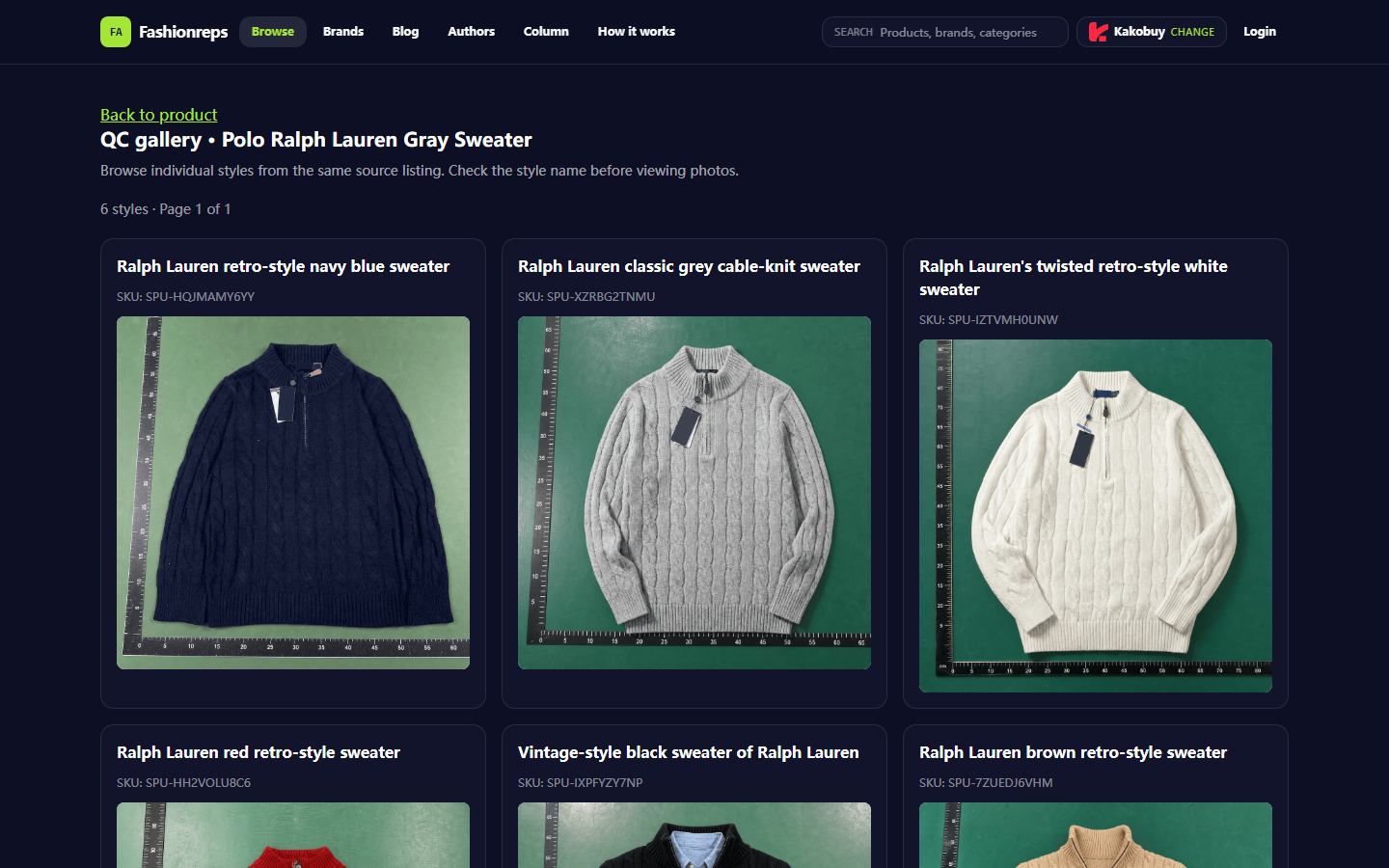
The current screenshot shows the QC page for a Polo Ralph Lauren Gray Sweater and multiple style options from the same source. It does not contain a current coupon code or checkout discount that can be confirmed, so the discount amount still needs to be rechecked on the actual shopping agent's page.
Check the Coupon's Claim Method, Validity Period, and Order Threshold
After entering the actual shopping agent that handles the order, first look at the full description of the promotion. The key isn't the promotion title, but the condition fields in the promotion rules.
Check in order:
- Whether the discount requires manual claim, entering a promo code, or is automatically matched by the system.
- Whether the promotion has a start and end time, and confirm the time zone.
- Whether the order threshold is based on product amount, product plus shipping, or another amount defined by the promotion.
- Which currency the threshold uses, and whether the displayed amount has been converted.
- Whether the discount is limited to new users, specific accounts, specific payment methods, or specific regions.
- Whether there are usage limits per account, per order, or per promotion period.
- Whether the promotion requires a specific shipping route or service type.
If the rules don't clearly state the threshold basis, don't add up product amount, storage fees, domestic shipping, and international shipping on your own to judge eligibility. First rely on the eligibility indication shown on the checkout page, and keep records of the promotion description and checkout results. ⏱️
Determine If the Knitwear Falls Under Eligible Categories and If Any Variants Are Excluded
Discounts are often restricted by category, brand, store, product tag, or promotion batch. Even if the name includes the same brand words for Polo Ralph Lauren knitwear, you cannot directly infer that all colors, styles, and source links are eligible.
Check in the following order:
- Whether the promotion rules explicitly include knitwear, sweaters, or the corresponding clothing category.
- Whether the product page or cart shows an eligible discount marker.
- Whether the current color and size still belong to the same product variant.
- Whether sale, clearance, pre-order, bundled items, or special source links are excluded.
- Whether the promotion applies only to specific stores, specific product numbers, or specific order types.
- Whether the discount eligibility changes when the cart quantity changes.
If the discount only appears on the product listing page but disappears after adding to cart, follow the cart and checkout page. If the same product has different amounts for different sizes or colors, confirm each separately; don't use a hint for one variant to conclude for another.
How to Check Discount Amount, Service Fees, and Final Due Basis on the Checkout Page
Discount verification must be done on the checkout page, because a reduction in product amount doesn't necessarily equal a reduction in the total final due for the order. Service fees, domestic shipping, storage-related fees, international shipping, and other fees listed on the page may be calculated by independent rules.
Record amounts in this order:
- Product subtotal
- Amount before discount
- Discount name or promo code identifier
- Discounted amount
- Domestic shipping or handling fees
- Service fees and other listed fees
- International shipping cost, if already incurred at this step
- Taxes or fees possibly borne by the destination country, if listed on the page
- Final amount due
Don't treat international shipping, taxes, or customs fees that haven't been generated yet as confirmed amounts. Also don't just compare the product subtotal before and after discount and claim the whole order saved the same amount. The final amount due should be compared under the same currency, quantity, shipping choice, and account conditions.
If the checkout page doesn't show a discount line, or the total hasn't changed, don't continue to pay and assume it will be refunded automatically later. First check the claim status, threshold, exclusions, and applicable services, then decide whether to keep the order draft or exit checkout. 💳
How to Record When Multiple Coupons or Promotions Cannot Be Combined
When multiple discounts appear simultaneously, first check whether the rules allow stacking. Common conflicts include choosing only one of two coupons, a coupon not being usable with a sale price, or choosing only one of product discount and shipping discount.
You can create a simple record:
| Plan | Conditions to meet | Actual reduction on checkout | Extra fees or limits | Suitable for current order |
|---|---|---|---|---|
| Plan A | Check threshold as shown on promotion page | Subject to checkout page | Check applicable account and validity | Item-by-item confirmation |
| Plan B | Check if conflicts with Plan A | Subject to checkout page | Check specified route or payment method | Item-by-item confirmation |
Comparisons are meaningful only under the same cart, same product quantity, same shipping choice, and same currency. Don't directly subtract amounts from different pages, different times, or different shipping plans.
Combining orders or increasing quantity may sometimes meet product discount thresholds, but it may also increase parcel value, volumetric weight, or single-shipment loss risk. If the discount savings are less than the added fees, or the order exceeds your acceptable loss range, don't add items just to meet the threshold. 📦
Verification Process When the Page Has No Current Coupon Code or Conditions Are Incomplete
If the page doesn't publish a coupon code, or the promotion description lacks validity period, threshold, categories, and exclusions, don't replace current rules with old codes from search results. Follow this process:
- Return to the actual shopping agent's official promotion page or account coupon center.
- Check whether you need to log in, claim, or select a specified service.
- Add the exact product variant to the cart; don't use a similar style as a substitute.
- Go to the checkout page and see whether the system clearly shows discount eligibility and the reduction amount.
- Record the validity period, threshold, currency, and restrictions shown on the page.
- If conditions are still incomplete, contact the shopping agent's customer service to confirm, and keep a written reply.
- Before the discount is clearly effective, don't budget based on expected savings, and don't add unrelated items to meet the threshold.
This article doesn't have current officially supported coupon codes, discount percentages, or fixed savings amounts, so it cannot confirm that a particular Polo Ralph Lauren knitwear order will definitely get a discount. What can be confirmed is the verification path: product variant, promotion rules, cart eligibility, and checkout total must correspond with each other.
Pre-Submission Checklist for Product, Discount, and Amount Review
Before submitting, check item by item:
- Product name matches the target style.
- Color, size, and quantity are accurate.
- Product amount matches the current checkout page display.
- Discount is clearly shown as claimed, applied, or available.
- Promotion validity period covers the current submission time.
- Order threshold, account conditions, and applicable region are met.
- Product category, store, and specific variant are not excluded.
- No misuse of discount info from other orders, other currencies, or other accounts.
- Service fees, shipping fees, taxes, and other listed fees are recorded separately.
- Final amount due matches your budget.
- Destination country's import restrictions, taxes, and customs responsibilities are confirmed based on actual circumstances.
- Don't add unnecessary items or accept unacceptable parcel risks just for a small discount.
Savings can only be based on the actual reduction on the checkout page; added risks may include buying more items to meet the threshold, choosing a restricted shipping route, increasing parcel value, or changing an originally safer split-shipment plan. This is suitable for buyers willing to carefully check promotion rules, product variants, and final amounts. It is not suitable for buyers who cannot confirm the coupon code source, promotion validity, or checkout reduction, yet still plan to pay based solely on promotional text.