Editor score 4.2 / 5
Insight
When you see a Gucci product link on FashionReps, but the page doesn't fully display the product name, color, size, material, or purchase entry, you shouldn't proceed with the order based only on thumbnails or brand labels. This guide addresses only one question: how to determine whether an incomplete Gucci product link already meets the minimum conditions for further verification or purchase. After reading, you should be able to categorize information into "confirmed," "evidence to be supplemented," and "must pause," and decide whether to continue viewing product details, ask through official channels, or hold off. 🧭

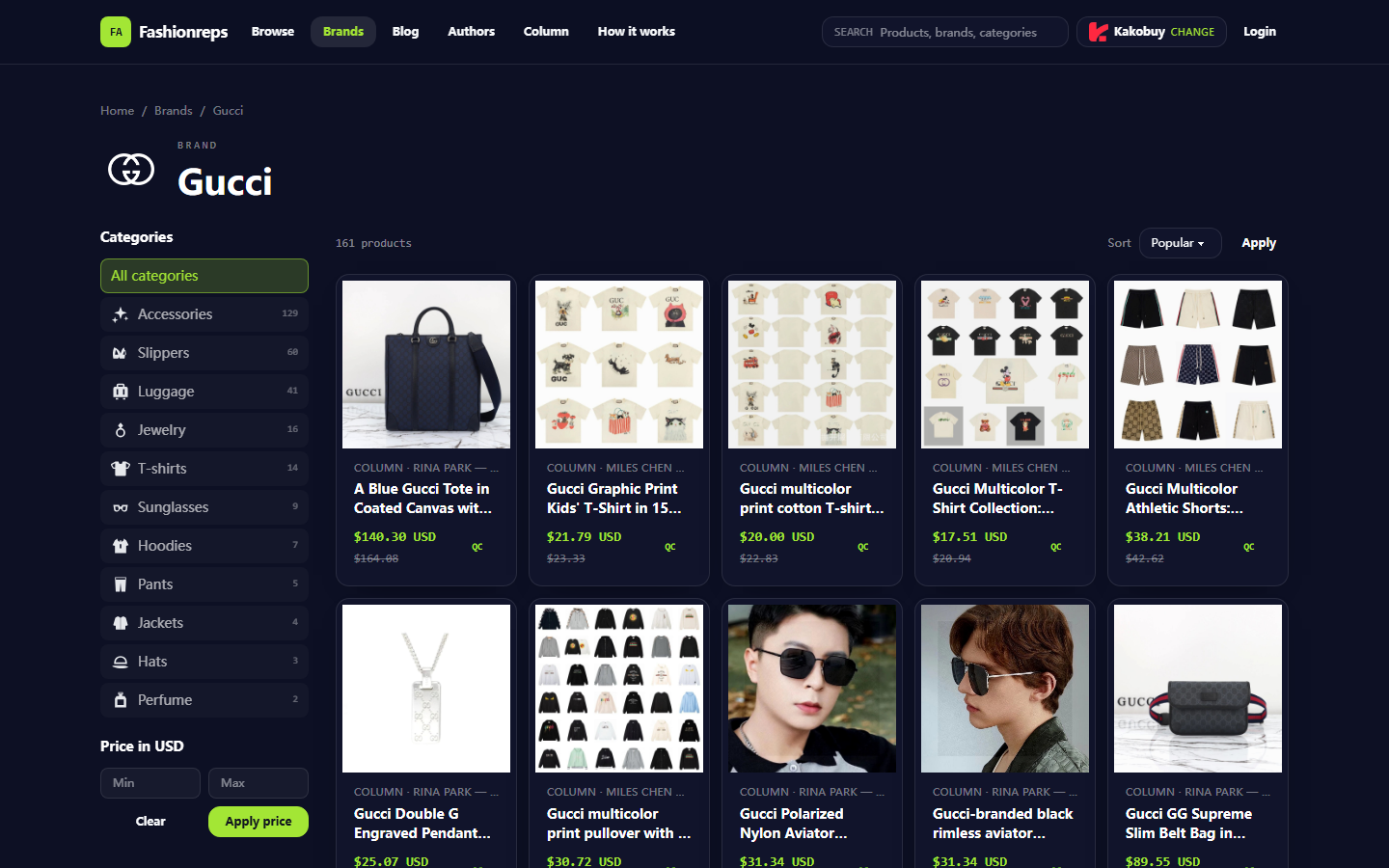
The illustration is an example of the FashionReps Gucci brand catalog page. The catalog information and link status on the page are time-sensitive; this article explains based on the information visible as of October 16, 2026. Actual product pages, prices, inventory, and redirect results should be re-confirmed when you are ready to purchase.
Clarify the Scope of Verification for Incomplete Gucci Link Information
Here, "incomplete information" does not refer to a page with little text, but to the absence of key fields that would affect purchase judgment, such as:
- Only the Gucci brand name, without a clear product name or style description.
- There are images, but no color, size, dimensions, or material description.
- A product detail page exists, but the purchase button, agent selection, or original link cannot redirect properly.
- The page shows a reference price, but does not explain the applicable specifications, variants, or the time of price verification.
- The images, title, and description appear to refer to different products.
FashionReps' Gucci catalog page displays brand categories, product types, price filters, and multiple product entries, but catalog information cannot automatically replace the specific product detail page. The reference price in the catalog should not be directly regarded as the current purchasable price, a commitment to stock, or the final landed cost.
This verification only answers "whether this link meets the conditions for further verification or pre-order confirmation," not whether the product is authentic, nor does it treat the brand name on the page as proof of authenticity.
Confirm Visible Title and Specifications from the Product Detail Page
After opening the link, first confirm whether the page has a clear, reviewable product title. The title should at least distinguish the product category and style, such as bags, shoes, T-shirts, glasses, or accessories; generic names like "Gucci product" or "Gucci item" are insufficient to support further verification.
Then record the specification fields currently visible on the page:
- Product category and style name.
- Available colors or patterns.
- Available sizes, or specific dimensions for bags and accessories.
- Material description, and which part the material corresponds to.
- Product quantity, stock alerts, or out-of-stock status.
- Currently displayed price, currency, and price applicability.
- Whether the purchase button exists, and if clicking it enters the expected process.
Do not treat the reference price on the page as the final payment amount. Agent service fees, domestic shipping, international shipping, insurance, destination country taxes, and other possible costs must be confirmed separately according to the actual purchase channel. If the page does not clearly state which specification the price corresponds to, mark the price as pending verification instead of proceeding with the lowest number.
Check Whether Images, Colors, Sizes, and Product Descriptions Correspond
Complete product information does not mean the information is consistent with each other. Compare images and text item by item, focusing on the following situations:
- The image shows a black version, but the color options only include brown or other colors.
- The title specifies a certain size, but the description uses a different set of sizes.
- The image shows multiple accessories, but the text does not state whether all are included.
- The title says leather, but the material field does not have a corresponding description, or uses vague wording.
- Different images on the same page appear to be of different styles, patterns, or sizes.
- The size chart does not match the product category, such as missing units for clothing or no sizing system for shoes.
Images can only be used to check what is displayed on the page; they cannot prove that the material feel, workmanship quality, authenticity, or actual color is completely consistent. Screen, lighting, and compression can all cause visual differences, so "looks like the same color" is only a preliminary judgment.
If the product has multiple variants, record the name, price, and stock status of each variant separately. Do not default to the first option as the specification shown in the image, and do not add the product to the final order when the variant is not confirmed. 🔍
Verify Link Redirects, Page Status, and Key Fields
The link itself also needs to be checked. Follow the sequence below to reduce the chance of mistaking a catalog page, a dead page, or a wrong product page for the target product:
- Copy or confirm the actual opened address on the current page, and observe whether multiple redirects occur.
- Confirm that the page after redirect still shows a Gucci product, not a brand catalog, search result, or login prompt.
- After refreshing the page, check whether the title, specifications, and price are still present.
- Open the product images, specification options, and purchase button separately to confirm they do not point to different products.
- Check whether the page shows a 404 error, blank content, infinite loading, product delisted, or inability to select specifications.
- Exit the current product page and re-enter from FashionReps' Gucci catalog, comparing the product name and image seen twice.
The table below can be used to record a verification result:
| Verification Item | Conditions to Continue Verification | Conditions to Pause |
|---|---|---|
| Product Identity | Title, image, and category match | Only brand name or image, unable to identify style |
| Specification Info | Clear options for color, size, or dimensions | Key specifications missing or contradictory across sections |
| Page Status | Accessible normally after refresh | 404, blank page, repeated redirects, or product delisted |
| Purchase Entry | Button enters expected agent or purchase process | Button unresponsive, redirects to wrong product, or requests unusual information |
| Price Info | Currency, variant, and applicable conditions clear | Only reference price, unable to determine corresponding specification |
If the page only meets some conditions, keep records of missing fields and page screenshots, but do not write "product information confirmed" when you have only seen product images.
Distinguish Confirmed Information, Evidence to Be Supplemented, and Editorial Judgment
It is recommended to divide verification results into three layers to avoid mixing speculation into facts:
Confirmed information is what you directly see on the current page and can reopen to verify, such as the product title, color options displayed on the page, displayed price currency, and button status. When recording, note the verification date and page location.
Evidence to be supplemented is content that the page does not provide, provides incompletely, or that can only be confirmed through pre-purchase consultation, such as actual inventory, final shipping costs, material details, variant-specific prices, whether accessories are included, and destination country taxes.
Editorial judgment is a risk assessment made based on the page structure, such as "images and description may not correspond" or "this link temporarily does not meet the conditions for placing an order." Editorial judgment must not be written as a platform-confirmed failure, nor as a product quality issue.
For the brand name and product description displayed on the page, this article only regards them as visible page information, not as Gucci official certification, proof of product authenticity, or seller reputation guarantee. 📝
Set Questions to Ask Through Official Channels
When the page lacks key fields, you should ask specific questions through the official support or designated purchase channel provided on the FashionReps page. Questions should focus on one link and one item to be confirmed, avoiding sending unnecessary personal information, complete order details, payment card information, passport, or full shipping labels.
You can prepare the following questions:
- What is the complete product name and style number currently associated with this link?
- Which color, size, or dimension options correspond to the page images?
- Which specific variant does the currently displayed price correspond to, and is it still valid?
- Is the product in stock, and will there be a prompt before purchase if it is out of stock?
- Are the material, dimensions, and accessory list in the product description complete?
- Which officially supported purchase process will be entered after clicking the purchase button?
- When the page is invalid, redirects incorrectly, or information is inconsistent, what page address and screenshot should be submitted?
Before submitting screenshots, cover names, phone numbers, order numbers, payment information, and other personal data. Keep only the areas that help determine the status of the product page.
Set Risk Boundaries for Pausing Operations
If any of the following situations occur, pause adding to cart, paying, or submitting purchase requests to agents:
- Unable to confirm the specific Gucci product corresponding to the link.
- Unexplained contradictions among images, title, color, size, or dimensions.
- Page is invalid, redirects to irrelevant pages, or content disappears after refresh.
- Price does not clearly correspond to specifications, currency, or applicable conditions.
- Purchase button requests sensitive personal information unrelated to normal product verification.
- You cannot confirm whether the product includes the accessories in the images, or cannot determine the selected variant.
- The purchase requires under-declaring, splitting orders to avoid taxes, or evading destination country inspections.
Pausing does not mean the product is necessarily problematic; it only means the current evidence is insufficient to support further action. If the issue can be resolved through official channels, recheck the page after resolution, rather than continuing to use old screenshots or old prices. ⏸️
Complete the Decision to Continue Buying or Pause According to the Checklist
Before making the final decision, you can complete a short check in the following order:
- Write down the current link and verification date.
- Record the product title, category, color, size, or dimensions displayed on the page.
- Compare images and description, marking all inconsistencies.
- Confirm that the page is still accessible after refresh and that the purchase entry does not redirect incorrectly.
- Mark the price as page reference price or confirmed variant price, without confusing the two.
- List items still to be confirmed, such as inventory, material, shipping costs, taxes, and accessories.
- Submit specific questions to official support or designated purchase channels.
- Only proceed to the next step when the product identity, selected specifications, and purchase path are all clear.
Continuing with the purchase is appropriate when: product identity is clear, key specifications are consistent, page status is stable, purchase path is normal, and remaining questions will not change your basic judgment about the product or cost. Pausing is appropriate when missing information would change the selected product, final price, compliance, or delivery expectations.
This approach may add a few minutes of verification time, but it can reduce the risk of buying the wrong variant, misreading reference prices, entering wrong links, or bearing payment risks when evidence is insufficient. It is more suitable for buyers who value documentation, need to check multiple specifications, or have doubts about prices and product descriptions. If you are just browsing for inspiration and are not ready to purchase, you can save the link first, but do not treat saving the link as completed verification. ✅