Editor score 4.2 / 5
Insight
Pause Payment and Confirm It's the Same Variant
If the capacity shown on the creed perfume product page differs from that in your cart, do not proceed to payment based solely on product images or names. First, retain key information from the product page, cart, and order draft, then check them one by one to ensure they refer to the same item.
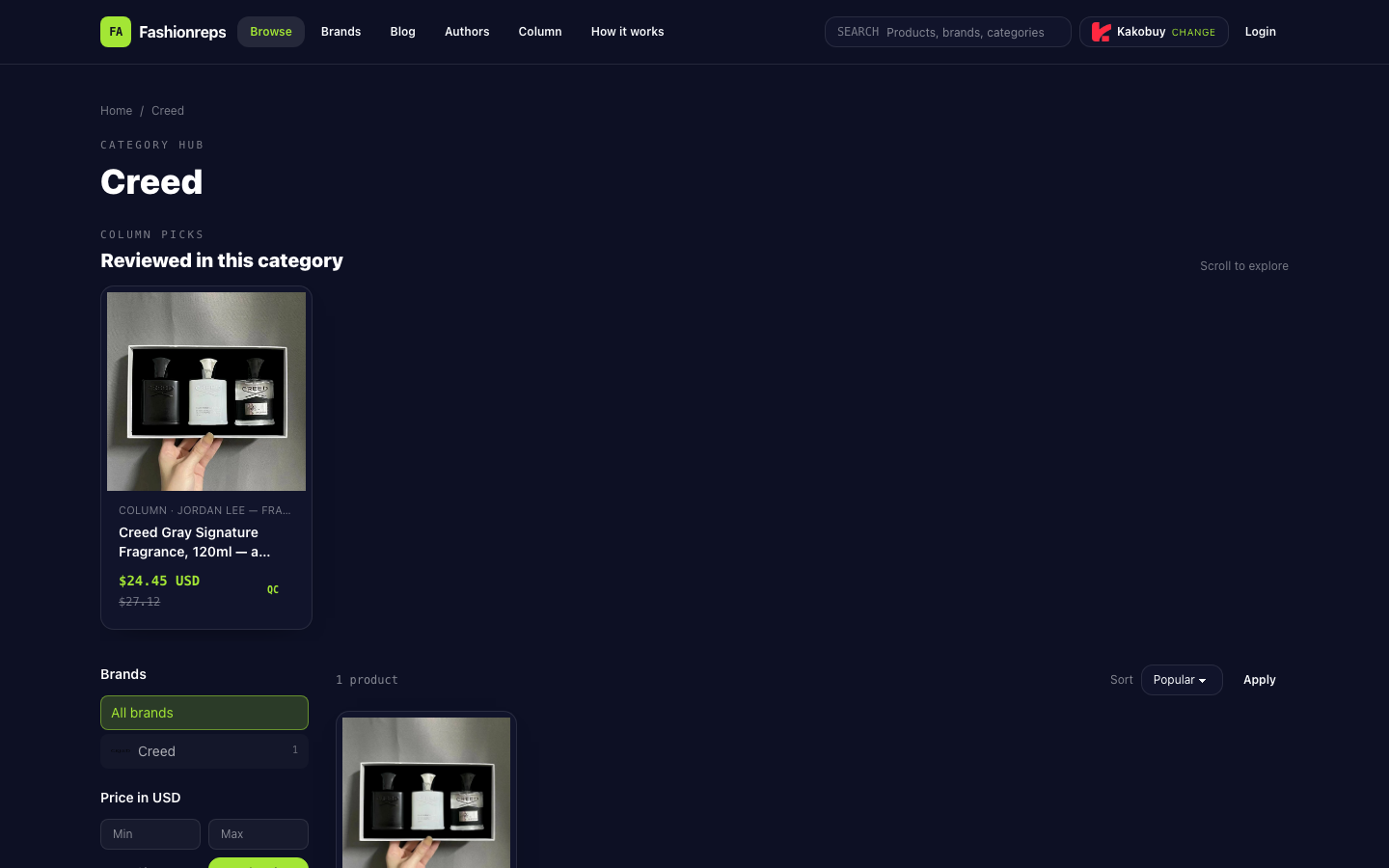
The Fashionreps Creed category page currently displays a Creed Gray Signature Fragrance with a 120ml capacity, described as a Silver Mountain Water style perfume featuring citrus, tea, and sandalwood notes. The page also shows a reference price of $24.45, with a previous reference price of $27.12. The page itself only verifies catalog information, not that the cart or order draft has retained the same capacity.

Document Evidence Before Payment
Before refreshing the page, changing quantities, or submitting an order, it's advisable to save the following:
- The fragrance, capacity, color, or packaging variant shown on the product page
- The original product link and the actual link after clicking purchase
- Product title, main image, and variant selection area
- The product name, capacity, quantity, and thumbnail in the cart
- The product details, capacity, and quantity in the order draft
- Page timestamps or screenshot file names to help explain the issue to Agent support later
If the product page does not have a separate capacity selector, also record the capacity explicitly stated on the page. Do not infer it from bottle proportions, image text, or other products' specifications.
Compare Field by Field
| Field to Check | What to Record from Detail Page | What to Verify in Cart or Order Draft |
|---|---|---|
| Product Name | Is it Creed Gray Signature Fragrance | Has the name been truncated or replaced with another name |
| Capacity | Does it clearly show 120ml or another capacity | Does it still show the same capacity, or has it become unspecified |
| Variant | Fragrance, color, packaging selections | Do the cart items match the selections on the detail page |
| Link | Original product link and post-click link | Can the cart item link back to the same product page |
| Quantity | Quantity selected on the page | Does the quantity in the cart and order draft match |
| Image | Main image and packaging image | Does the thumbnail clearly correspond to the same product |
Focus first on the capacity field and the redirect link. Similar titles and identical main images alone do not prove capacity consistency; if the order draft only shows a generic name that cannot be verified, do not treat it as a confirmed capacity.
Check the Purchase Button Redirect
Fashionreps page states that the product's purchase button redirects to the user's selected shopping Agent. When opening the page after clicking the purchase button, first confirm whether the product link, product title, and variant information in the address bar still correspond to the original page.
If any of the following occur after the redirect, pause operations:
- Redirected to a different product or cannot return to the original product details
- Detail page shows 120ml, but cart shows a different capacity or no capacity
- A variant was selected on the detail page, but the cart shows the default variant
- Product image, packaging, or name is significantly different from the original page
- The capacity field in the order draft is empty and cannot be confirmed from other fields
Do not test the issue by repeatedly clicking purchase, re-adding to cart, or creating duplicate orders. This may generate duplicate entries and make troubleshooting more difficult.
When to Proceed and When to Stop
Only when the product link, name, capacity, variant, image, and quantity all correspond and the capacity in the order draft matches the detail page, is it appropriate to continue checking other payment information.
Stop payment and order submission if any of the following occur:
- Capacity mismatch and the page has no clear variant explanation
- Cannot confirm which product link the cart corresponds to
- Order draft lacks capacity or shows an unselected default variant
- Product information changes after refresh without new verifiable explanation
- Page or cart cannot be opened, preventing confirmation of key fields
Stopping payment does not mean concluding that the platform has malfunctioned; it only indicates that current evidence is insufficient to confirm the specific variant you will purchase.
Submit Evidence to Current Agent Official Support
Fashionreps page states that orders, payments, and shipping are handled by external shopping Agents. Therefore, when capacity mismatch occurs in the cart or order draft, consult the official support channel of the currently selected Agent, rather than treating unconfirmed cart information as a final commitment from the Fashionreps catalog page.
When submitting, explain in the following order:
- Provide the original product link and the link after clicking the purchase button.
- State the fragrance, capacity, variant, and quantity shown on the detail page.
- State the different fields shown in the cart or order draft.
- Attach screenshots of the detail page, cart, and order draft, and note the screenshot times.
- Clearly ask which capacity and variant should be the basis before payment.
Before receiving a clear reply, do not pay, do not delete original cart records, or create multiple identical orders. If support staff can only confirm the product name but not the capacity or variant, continue to keep evidence and suspend the transaction.
Verification Conclusion
The key to this type of issue is not judging whether pages look similar, but confirming whether the same product link retains the same capacity and variant across the detail page, cart, and order draft. The current Creed category page confirms that there is a 120ml item in the catalog, but it cannot alone prove that your cart or order draft corresponds to that capacity. When evidence cannot be closed, stopping payment and submitting complete screenshots and links to the current Agent's official support is a safer approach.