Editor score 4.2 / 5
Insight
When you open a New Balance shoe link and find that the title, color, size, images, or product description don't match, don't place an order directly, and don't judge whether the product has changed based solely on search results pages or old screenshots. This article addresses only one specific problem: when the product entry in the fashion-reps catalog is inconsistent with the product page that opens, how to verify item by item and decide to confirm, gather more evidence, or stop.
After reading, you should be able to do four things: record where the inconsistencies are, distinguish between redirect issues and page updates, provide verifiable information to the target site, and pause the purchase when evidence is insufficient. This article does not apply to situations where payment has already been completed, warehouse inspection, or after-sales disputes; these stages require separately checking orders, QC images, and platform after-sales rules. 🔎

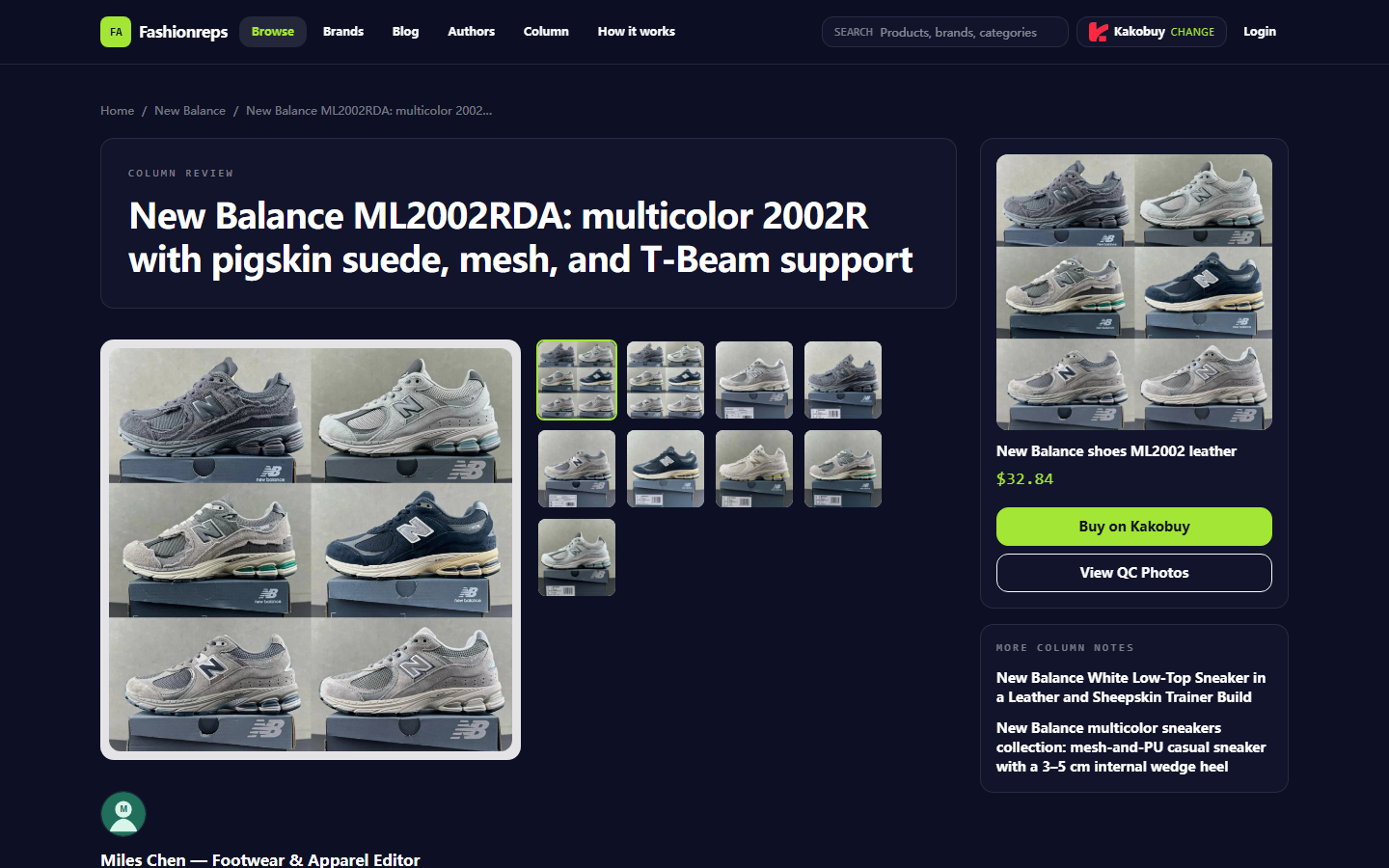
Figure: Product page screenshot used to verify product title, materials, size range, and purchase entry.
What This New Balance Product Information Inconsistency Needs to Resolve
This verification targets a New Balance ML2002RDA product page. The visible information on the page includes: the product title is New Balance ML2002RDA, the description involves multi-color 2002R, pigskin suede, mesh material, and T-Beam support. The page lists the size range as 36–45 and shows a reference price of $32.84. The page also notes that the final product price, service fees, and international shipping costs need to be confirmed on the selected shopping agent platform.
This information can only serve as visible evidence on the current page; it cannot automatically prove that a specific shoe box, physical color, inventory status, or buyer feedback is consistent with the page. The page also clearly distinguishes between model-level information and feedback specific to this product link: there are currently no citable buyer reviews for this link, and some support, durability, and sizing information comes from public information at the 2002R model level, not independent testing of this specific product.
Therefore, the goal of verification is not to judge "this must be a fake link" or "this must be fine," but to answer three actionable questions:
- Does the catalog entry still open the same target page?
- Are the title, color, size, images, and specifications on the target page consistent with each other?
- When evidence is insufficient, should you first seek confirmation from the site or shopping agent instead of continuing to place an order?
First Confirm the Product Entry and Current Visible Page from the fashion-reps Catalog
First, open the product entry from the fashion-reps catalog, then record the final page address displayed in the browser address bar. Don't just copy the text on the catalog card, because the catalog title may update slower than the target page, and don't just save the purchase address generated by the agent platform, because agent links may contain selection parameters or promotional parameters.
It is recommended to verify in the following order:
- Reopen the New Balance product entry in the fashion-reps catalog.
- Record the catalog title, product category, and entry position before opening.
- After the page is fully loaded, record the final address, page title, and page update time information.
- Confirm whether the page still belongs to the New Balance category and displays a clear product name.
- Record whether the page shows redirects, blank content, images that cannot load, or a page with only tags and no product description.
- Open again in an incognito window or logged-out state to observe whether the page content remains consistent.
One open result cannot prove that all visitors see the same page. Cache, login status, region settings, shopping agent selection, and page updates can all change visible content. If two visits yield different results, save the query times and addresses of both, and do not treat one as the sole truth. 📌
The current page provides a visible shopping agent selection interface, and the page shows that the shopping agent can be changed. Therefore, differences in title or parameters between the catalog page and the shopping agent page do not necessarily mean the product itself has changed; you must continue to verify the actual product name, color, size, and product images passed on the agent page.
How to Record Inconsistencies in Title, Color, Size, and Images Separately
Don't write all differences as "link broken." Different fields have different risks, and recording methods should differ.
| Verification Item | Evidence to Record | Situations That Can Be Temporarily Confirmed | Situations That Should Be Paused |
|---|---|---|---|
| Title | Catalog title, target page title, agent page title | Only abbreviations, punctuation, or model format differences, and other fields are consistent | Model, category, or brand completely different |
| Color | Page color text, option names, main image and detail images | Color names differ but images, model, and options correspond to each other | Color text clearly conflicts with all visible images |
| Size | Page size range, available sizes, agent page available sizes | Catalog shows a wider range, target page shows current available range | Target page has no size, or agent page cannot select the size claimed by the page |
| Images | Main image, detail images, image files or page locations | Images are only cropped, ordered, or thumbnail differences, and key product features are consistent | Images clearly belong to another style, color, or brand |
| Specifications | Material, support structure, sole, or other product descriptions | Text expression slightly different but no conflict | Specifications contradict images, model, or options |
Using the current page as an example, the page text mentions pigskin suede, mesh upper, T-Beam support, and exposed heel cushioning. If the opened image only shows another upper structure, or the page options correspond to another model, you cannot continue to order based solely on the partial title "New Balance 2002R."
Also distinguish between model-level information and link-level information. The sizing advice, stability, or durability descriptions given for the 2002R cannot replace confirmation of a specific color, specific size, and specific batch. Don't rewrite model information as "this shoe has passed physical inspection." 👟
How to Distinguish Between Product Link Redirect Anomalies and Page Content Updates
Link redirect anomalies typically manifest as: the address is taken to an unrelated category page, the page returns an error, the page displays only an empty shell, the product name is completely unrelated to the entry, or each opening lands on a different target. Page content updates may manifest as: the address remains stable, the product model remains consistent, but the price, available sizes, images, description, or shopping agent parameters change.
You can use a simple three-time verification method:
- First time: Open directly from the fashion-reps catalog and record the complete result.
- Second time: Copy the final address, open in a new tab, and check if it lands on the same page.
- Third time: Log out or use an incognito window to open, check if the title, images, and visible specifications remain consistent.
If all three times lead to the same product page, but page fields change, it is more likely a content update or option status change. If the catalog entry and the copied final address cannot consistently point to the same clear product, it is more likely an entry or redirect anomaly.
Do not judge a link error solely because the page price changes. The current page has already explained that the reference price does not equal the final payment amount, and service fees and international shipping costs need to be confirmed on the shopping agent website. Price, inventory, size, and shipping are all highly volatile information, and you should re-record the query date, destination country, and currency before publishing or ordering. The page verification time this article is based on is September 26, 2026; this does not mean the page content will not change later.
How to Pause Ordering When Specifications or Brand Evidence Are Missing
If the target page only has blurry images, lacks a clear model, lacks color options, or the page text conflicts with the images, you should mark the product status as "pending further evidence" instead of choosing an option that looks closest.
Before pausing the order, save the following minimum evidence package:
- The complete address of the fashion-reps catalog entry.
- The final address opened by the browser.
- Catalog title and target page title.
- Main page image and detail images showing differences.
- Original text for color, size, and specifications.
- Query time, time zone, destination country, and currency.
- Product name, options, and price shown on the shopping agent page.
When taking screenshots, keep only the areas needed for judging the product. Do not disclose order numbers, payment cards, passports, complete shipping labels, phone numbers, or personal addresses. If the agent page has generated personalized order information, cover these contents before saving or submitting. 🔐
The following situations suggest stopping operations until supplementary evidence is obtained:
- The page cannot display a clear product name.
- The models in the catalog, target page, and agent page cannot correspond.
- Color or size options cannot be confirmed.
- Images appear to belong to another product.
- The page claims to have buyer reviews, but the current page has no verifiable review content.
- Only old screenshots, search snippets, or third-party reposts can be relied upon.
- Reducing purchase risk through under-declaration, order splitting for tax evasion, or inspection evasion is needed.
How to Save Page Screenshots, Links, and Query Times
When saving evidence, the file name should reflect the product and time, for example: new-balance-ml2002rda-page-2026-09-26.png. Also create a brief record indicating whether the screenshot corresponds to the catalog, target page, or shopping agent page, to avoid mixing pages from different stages later.
It is recommended to keep the following fields:
- Page role: catalog entry, target product page, or agent purchase page.
- Page address: save the final accessible address, not just the anchor text.
- Page title: copy the visible title completely.
- Key fields: color, size, material, model, and price.
- Query time: accurate to the minute, and note the time zone.
- Page status: normal, updating, partially loaded, redirect anomaly, or pending further evidence.
- Screenshot description: point out where the difference is, not just write "information inconsistent."
If the page changes later, add a new record, do not overwrite the original screenshot. This can distinguish between "page updated after query" and "wrong page opened initially." If the target site provides a page feedback entry, use these records as verification materials, rather than directly claiming the site is malfunctioning. 🧾
What Information to Provide When Reporting Problems to the Target Site
Feedback should be as short as possible and allow the other party to reproduce. It can be described in four parts: "entry, result, difference, expectation":
- Entry: Which product entry from fashion-reps was used.
- Result: What page was finally opened, what the address and title are.
- Difference: Which item among title, color, size, images, or specifications is inconsistent.
- Expectation: Hope to confirm the current valid page, correct the catalog entry, or supplement missing specifications.
An example expression is as follows:
"On September 26, 2026, I opened the page from the New Balance ML2002RDA product entry in fashion-reps. The catalog title and the target page model are basically consistent, but the color options on the target page do not correspond to the main image, and the agent page does not show the same color name. Please confirm the currently valid color options and product entry; I will not continue to order before confirmation."
Do not submit complete order, payment information, or identity proof in the feedback. If the issue involves the agent platform's price, inventory, or available sizes, you should also check with the agent platform that actually provides the purchase service, because the catalog page cannot replace the agent platform's confirmation of final amount, inventory, and delivery conditions.
Final Action: Confirm, Gather More Evidence, or Remove Candidate
After completing verification, classify the product into one of three states:
- Confirm: The entry is stable, the title, model, color, size, and images correspond to each other, and highly volatile information has been re-verified according to destination country and currency.
- Gather more evidence: The product roughly corresponds, but one of color, size, specifications, or images cannot be confirmed, waiting for a reply from the site or agent platform.
- Remove candidate: The link continues to show redirect anomalies, the page lacks clear product evidence, or multiple key fields conflict with each other.
This page can support item-by-item verification of the New Balance ML2002RDA page information, but it cannot confirm the actual color, inventory, physical quality, or final cost of a specific shoe for every buyer. If you can only see model-level information and cannot obtain independent feedback for the specific link, you should handle "confirming the model" and "confirming this specific product" separately.
The safest next step is to first save evidence from the catalog entry, target page, and agent page, then confirm color and size, and finally proceed to price, service fee, and international shipping calculation. When unable to confirm, keeping a candidate record and pausing the order is usually more controllable than dealing with wrong models, wrong sizes, or wrong product pages afterwards.
Article Images

Agent Platform Shopping FAQs
1. How can I locate a specific product on litbuyjordan.com?
You can look up products by entering a single word or visit the category section directly, where items are also sorted by brand. Longer queries usually produce fewer matches than shorter ones, yet they are more accurate. For instance, you might type "Air Force 1 White," "sneakers," or just "Air Force 1."
2. What kinds of goods are available on litbuyjordan.com?
litbuyjordan.com carries a broad selection of categories, which includes footwear, tees, sweaters, hoodies, denim, joggers, shorts, swim trunks, factory outlet deals, puffer jackets, baseball jerseys, button-ups, caps, accessories, bags, gadgets, shades, socks, undergarments, and popular collectibles.
3. What should I do on litbuyjordan.com if I'm unhappy with the product I received?
Reach out to your agent platform's support staff right away. For merchants in China, the majority of non-specialty goods include a 5-day unconditional return and exchange option. If you are not satisfied, you can ask for a return. If the package has already left the warehouse and reached you, and you find a defect, you must contact the agent platform's customer service so they can assist you in reaching the merchant to work out a solution.
Here are the support email addresses for each platform:
kakobuy: service@kakobuy.com
oopbuy: support01@oopbuy.com
usfans: support@usfans.com
hipobuy: care@hipobuy.com
superbuy: care@superbuy.com
4. What should first-time users of litbuyjordan.com's agent platform keep in mind?
New users of the Taobao agent who initially access it through a spreadsheet usually receive a welcome shipping discount bundle. You should also review the step-by-step shopping tutorial for beginners.